Module
Tasks
Shared to-dos with owners, dates, repeats and streaks.
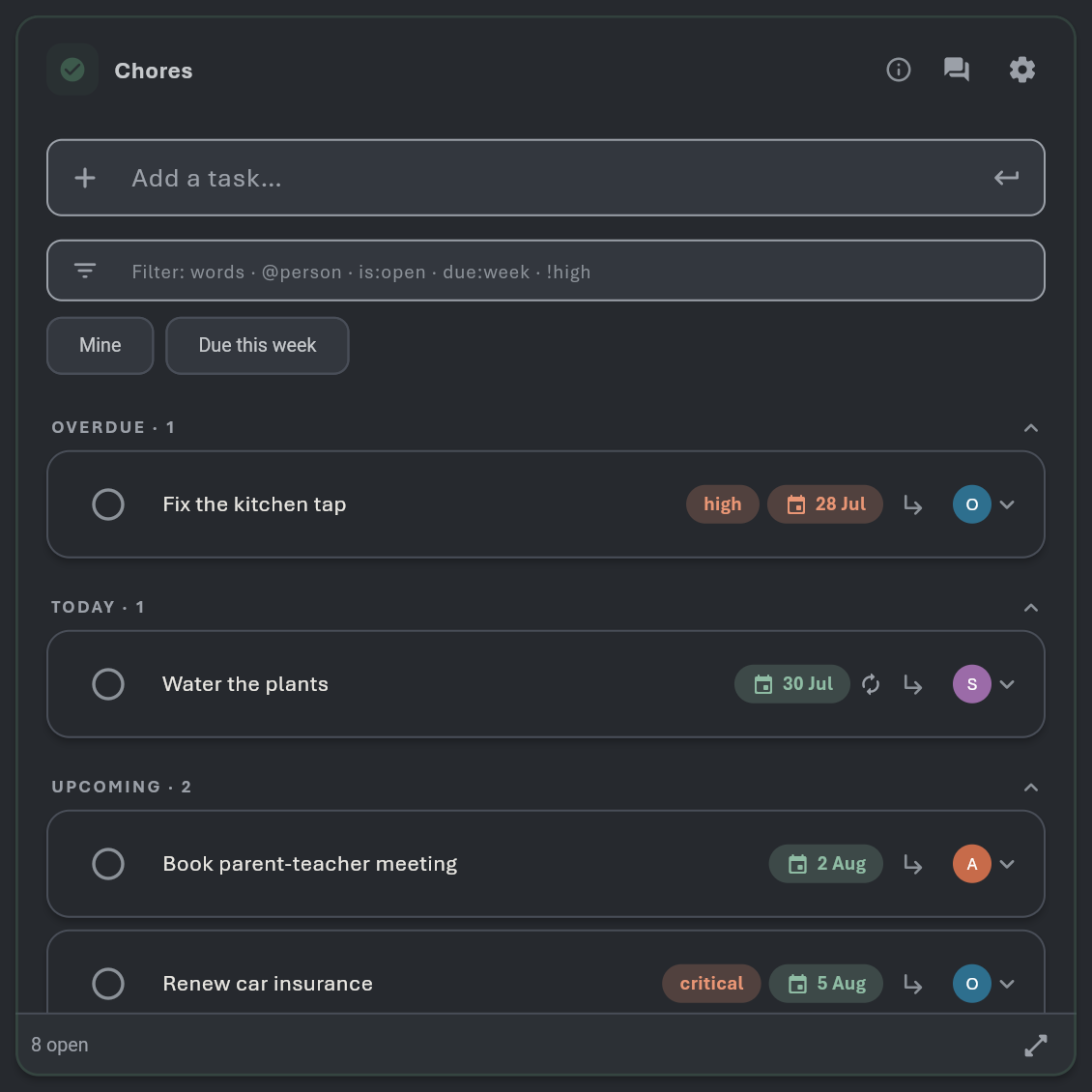
What it does · tap to open
Natural-language quick-add
"Pay rent tomorrow 5pm !high @Omar #bills" parses date, time, priority, assignee and tags in one line.
Due dates with optional CLOCK TIMES
Timed tasks render as blocks on the calendar's week/day hour grid.
Repeats
Daily/weekly/monthly plus fully custom rules (every N days, N×week, specific weekdays, until-dates).
Completing a recurring task rolls
Its due date forward and keeps it open — and quietly builds a grace-aware streak ("3 in a row").
One-level sub-tasks via the ↳ icon
Indentation survives markdown export/import.
Priorities (normal/high/critical) with pills
Overdue turns terracotta.
Assignees with avatar chips
Assigned tasks appear on that person's profile automatically.
Labels ARE tags
Chips on rows, one-tap tag filtering, shared workspace vocabulary.
Saved filters
Name your current search/filter combo and recall it from chips.
Grouping by due date
(Overdue / Today / Later / No date) with counts; configurable default sort (due / priority / created).
Done pile pages separately so the open
List stays fast.
Due-time push nudges through the notification engine
Snooze from the bell.
Bulk verbs
Long-press → Complete or Delete many at once.